Network Types and Topologies
Network Types and Topologies
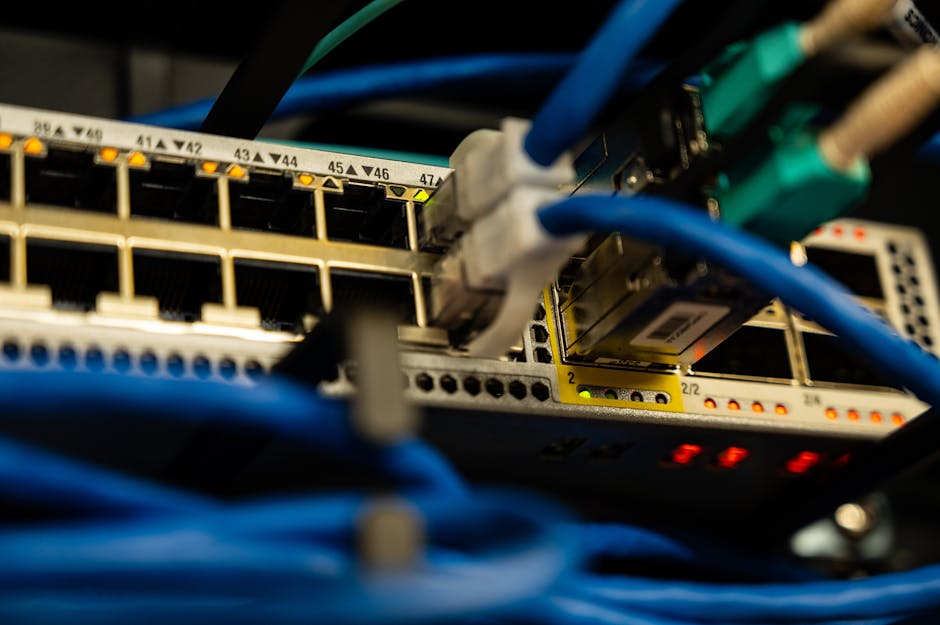
Photo by Brett Sayles on Pexels
Networking connects computers so they can share data and resources. Understanding network types, topologies, and hardware is fundamental to IT support.
Network Types by Scale
PAN (Personal Area Network): Very small network, typically Bluetooth devices within 10 meters. Example: phone paired with wireless earbuds and smartwatch.
LAN (Local Area Network): Network within a single building or campus. Ethernet (wired) or Wi-Fi (wireless). Typical speed: 1 Gbps wired, 300 Mbps-1.2 Gbps wireless. Most office networks are LANs.
MAN (Metropolitan Area Network): Network spanning a city or campus. Connects multiple LANs. Often uses fiber optic backbone. Example: a university campus with multiple buildings.
WAN (Wide Area Network): Network spanning large geographical areas. The internet is the largest WAN. Enterprise WANs connect branch offices using VPNs, MPLS, or SD-WAN.
WLAN (Wireless LAN): Wi-Fi based LAN. Uses 802.11 standards. 802.11ax (Wi-Fi 6) is current standard with speeds up to 9.6 Gbps theoretical.
Network Topologies
Star Topology: All devices connect to a central switch. Most common in modern networks. If one cable fails, only that device is affected. If the switch fails, the entire segment goes down.
Mesh Topology: Every device connects to multiple others. Provides redundancy — if one path fails, traffic routes another way. Used in Wi-Fi mesh systems and enterprise networks. More expensive due to multiple connections.
Bus Topology (legacy): All devices share a single cable. Cheap but one cable break takes down the entire network. Rarely used today.
Ring Topology: Each device connects to the next in a ring. Token passing protocol. Used in some industrial networks. Mostly replaced by star topology.
Hybrid Topology: Combination of star and mesh. Most enterprise networks are hybrid — star at the edge (switches), mesh at the core (routers).
Network Hardware
Switch: Connects devices in a LAN. Operates at Layer 2 (data link). Forwards frames based on MAC addresses. Managed switches allow VLANs, QoS, port security. Unmanaged switches are plug-and-play. PoE (Power over Ethernet) switches power IP phones, cameras, and access points.
Router: Connects different networks. Operates at Layer 3 (network). Forwards packets based on IP addresses. Home routers combine router, switch, Wi-Fi AP, firewall, and DHCP server in one device. Enterprise routers handle BGP, OSPF, and multi-WAN.
Access Point (AP): Wireless device that creates a Wi-Fi network. Connects wireless devices to the wired network. Enterprise APs support multiple SSIDs, VLANs, and band steering. Controller-based APs allow centralized management.
Firewall: Filters traffic between networks based on rules. Stateful firewalls track connection state. Next-Generation Firewalls (NGFW) include intrusion prevention, application filtering, and threat intelligence. pfSense and OPNsense are free firewall distributions.
Modem: Converts between digital signals and the ISP's transmission medium (cable, DSL, fiber). Usually provided by the ISP. A modem is not a router — it provides internet access, the router distributes it.
Cable Types
Twisted Pair (Ethernet): Most common LAN cable. Categories:
• Cat5e: 1 Gbps up to 100m (minimum standard today)
• Cat6: 10 Gbps up to 55m, 1 Gbps up to 100m
• Cat6a: 10 Gbps up to 100m (shielded)
• Cat8: 25-40 Gbps up to 30m (data center)
Uses RJ-45 connectors. Straight-through cable for PC-to-switch, crossover for switch-to-switch (though most modern switches auto-detect with MDI-X).
Fiber Optic: Uses light instead of electricity. Immune to electromagnetic interference. Single-mode (long distance, laser source, 100km+) and multimode (short distance, LED source, 500m). Used for backbone connections and ISP links.
Coaxial: Cable internet and TV. F-connector. Being replaced by fiber but still common in existing installations.
Step-by-Step: Setting Up a Small Office Network
Step 1: Connect the modem to the router's WAN port with an Ethernet cable.
Step 2: Connect the switch to a router LAN port.
Step 3: Connect all wired devices (desktops, printers, IP phones) to the switch.
Step 4: Connect the access point to the switch (or use the router's built-in Wi-Fi).
Step 5: Configure the router: change admin password, set Wi-Fi SSID and WPA3 password, enable firewall, set DHCP range.
Step 6: Configure the switch: set up VLANs (management, data, voice), enable port security.
Step 7: Test connectivity: ping the router (ping 192.168.1.1), ping 8.8.8.8 (internet), ping google.com (DNS test).
Free Network Tools
Nmap: Network scanner. Discovers hosts, open ports, and services. Free and essential for network auditing.
Wireshark: Packet analyzer. Captures and displays network traffic in real-time. Essential for troubleshooting network issues.
Angry IP Scanner: Fast IP address and port scanner. GUI-based, simpler than Nmap for quick scans.
iperf3: Bandwidth testing tool. Measures actual throughput between two machines. Reveals if your network delivers advertised speeds.
Common Network Issues
IP conflict: Two devices have the same IP. Causes intermittent connectivity. Fix: Release and renew IP (ipconfig /release then /renew), or set static IP.
Duplex mismatch: One end set to full-duplex, other to half-duplex. Causes slow speed and collisions. Fix: Set both ends to auto-negotiate.
Broadcast storm: Network loop causes traffic to multiply. Switch lights blink rapidly. Fix: Remove the loop, enable STP (Spanning Tree Protocol).
Bad cable: Intermittent drops, slow speeds. Fix: Replace cable. Test with a cable tester ($15 tool).
Key Takeaways
• Star topology is the most common LAN design — all devices connect to a switch
• Switches work at Layer 2 (MAC addresses), routers at Layer 3 (IP addresses)
• Cat6 cable supports 10 Gbps up to 55 meters — sufficient for most office runs
• Fiber optic is immune to EMI and used for backbone and long-distance connections
• Nmap and Wireshark are essential free network diagnostic tools
Common Questions
Q: Do I need a switch if my router has 4 LAN ports?
A: For up to 4 devices, no. For more, add a switch. Connect the switch to one router LAN port, then connect additional devices to the switch.
Q: What is PoE and do I need it?
A: Power over Ethernet sends power through network cables. Needed for IP phones, wireless access points, and IP cameras. Without PoE, these devices need separate power adapters.
Network Types and Topologies
Photo by Brett Sayles on Pexels
Networking connects computers so they can share data and resources. Understanding network types, topologies, and hardware is fundamental to IT support.
Network Types by Scale
PAN (Personal Area Network): Very small network, typically Bluetooth devices within 10 meters. Example: phone paired with wireless earbuds and smartwatch.
LAN (Local Area Network): Network within a single building or campus. Ethernet (wired) or Wi-Fi (wireless). Typical speed: 1 Gbps wired, 300 Mbps-1.2 Gbps wireless. Most office networks are LANs.
MAN (Metropolitan Area Network): Network spanning a city or campus. Connects multiple LANs. Often uses fiber optic backbone. Example: a university campus with multiple buildings.
WAN (Wide Area Network): Network spanning large geographical areas. The internet is the largest WAN. Enterprise WANs connect branch offices using VPNs, MPLS, or SD-WAN.
WLAN (Wireless LAN): Wi-Fi based LAN. Uses 802.11 standards. 802.11ax (Wi-Fi 6) is current standard with speeds up to 9.6 Gbps theoretical.
Network Topologies
Star Topology: All devices connect to a central switch. Most common in modern networks. If one cable fails, only that device is affected. If the switch fails, the entire segment goes down.
Mesh Topology: Every device connects to multiple others. Provides redundancy — if one path fails, traffic routes another way. Used in Wi-Fi mesh systems and enterprise networks. More expensive due to multiple connections.
Bus Topology (legacy): All devices share a single cable. Cheap but one cable break takes down the entire network. Rarely used today.
Ring Topology: Each device connects to the next in a ring. Token passing protocol. Used in some industrial networks. Mostly replaced by star topology.
Hybrid Topology: Combination of star and mesh. Most enterprise networks are hybrid — star at the edge (switches), mesh at the core (routers).
Network Hardware
Switch: Connects devices in a LAN. Operates at Layer 2 (data link). Forwards frames based on MAC addresses. Managed switches allow VLANs, QoS, port security. Unmanaged switches are plug-and-play. PoE (Power over Ethernet) switches power IP phones, cameras, and access points.
Router: Connects different networks. Operates at Layer 3 (network). Forwards packets based on IP addresses. Home routers combine router, switch, Wi-Fi AP, firewall, and DHCP server in one device. Enterprise routers handle BGP, OSPF, and multi-WAN.
Access Point (AP): Wireless device that creates a Wi-Fi network. Connects wireless devices to the wired network. Enterprise APs support multiple SSIDs, VLANs, and band steering. Controller-based APs allow centralized management.
Firewall: Filters traffic between networks based on rules. Stateful firewalls track connection state. Next-Generation Firewalls (NGFW) include intrusion prevention, application filtering, and threat intelligence. pfSense and OPNsense are free firewall distributions.
Modem: Converts between digital signals and the ISP's transmission medium (cable, DSL, fiber). Usually provided by the ISP. A modem is not a router — it provides internet access, the router distributes it.
Cable Types
Twisted Pair (Ethernet): Most common LAN cable. Categories:
• Cat5e: 1 Gbps up to 100m (minimum standard today)
• Cat6: 10 Gbps up to 55m, 1 Gbps up to 100m
• Cat6a: 10 Gbps up to 100m (shielded)
• Cat8: 25-40 Gbps up to 30m (data center)
Uses RJ-45 connectors. Straight-through cable for PC-to-switch, crossover for switch-to-switch (though most modern switches auto-detect with MDI-X).
Fiber Optic: Uses light instead of electricity. Immune to electromagnetic interference. Single-mode (long distance, laser source, 100km+) and multimode (short distance, LED source, 500m). Used for backbone connections and ISP links.
Coaxial: Cable internet and TV. F-connector. Being replaced by fiber but still common in existing installations.
Step-by-Step: Setting Up a Small Office Network
Step 1: Connect the modem to the router's WAN port with an Ethernet cable.
Step 2: Connect the switch to a router LAN port.
Step 3: Connect all wired devices (desktops, printers, IP phones) to the switch.
Step 4: Connect the access point to the switch (or use the router's built-in Wi-Fi).
Step 5: Configure the router: change admin password, set Wi-Fi SSID and WPA3 password, enable firewall, set DHCP range.
Step 6: Configure the switch: set up VLANs (management, data, voice), enable port security.
Step 7: Test connectivity: ping the router (ping 192.168.1.1), ping 8.8.8.8 (internet), ping google.com (DNS test).
Free Network Tools
Nmap: Network scanner. Discovers hosts, open ports, and services. Free and essential for network auditing.
Wireshark: Packet analyzer. Captures and displays network traffic in real-time. Essential for troubleshooting network issues.
Angry IP Scanner: Fast IP address and port scanner. GUI-based, simpler than Nmap for quick scans.
iperf3: Bandwidth testing tool. Measures actual throughput between two machines. Reveals if your network delivers advertised speeds.
Common Network Issues
IP conflict: Two devices have the same IP. Causes intermittent connectivity. Fix: Release and renew IP (ipconfig /release then /renew), or set static IP.
Duplex mismatch: One end set to full-duplex, other to half-duplex. Causes slow speed and collisions. Fix: Set both ends to auto-negotiate.
Broadcast storm: Network loop causes traffic to multiply. Switch lights blink rapidly. Fix: Remove the loop, enable STP (Spanning Tree Protocol).
Bad cable: Intermittent drops, slow speeds. Fix: Replace cable. Test with a cable tester ($15 tool).
Key Takeaways
• Star topology is the most common LAN design — all devices connect to a switch
• Switches work at Layer 2 (MAC addresses), routers at Layer 3 (IP addresses)
• Cat6 cable supports 10 Gbps up to 55 meters — sufficient for most office runs
• Fiber optic is immune to EMI and used for backbone and long-distance connections
• Nmap and Wireshark are essential free network diagnostic tools
Common Questions
Q: Do I need a switch if my router has 4 LAN ports?
A: For up to 4 devices, no. For more, add a switch. Connect the switch to one router LAN port, then connect additional devices to the switch.
Q: What is PoE and do I need it?
A: Power over Ethernet sends power through network cables. Needed for IP phones, wireless access points, and IP cameras. Without PoE, these devices need separate power adapters.
There are no comments for now.
to be the first to leave a comment.